

Learn how Global Ledger’s database became one of the key data sources for Hacken’s Extractor platform, enabling clients to monitor risks in real time.
Recently, one of the major exchanges faced a substantial fine due to "compliance gaps". A configuration error had left millions of transactions unmonitored and thousands of suspicious activity reports delayed. It’s the kind of situation no compliance team wants to be in — not because someone acted with bad intent, but because even a small oversight in a busy system can lead to large consequences.
For many VASPs, this news feels familiar. The workload is heavy, alerts are constant, and proving that every action was taken correctly can take hours. And still, regulators expect visibility, consistency, and timely reporting at all times.
Global Ledger’s new features — Compliance Memory, GL Lens, and Public Cases — are designed to support you like a reliable partner, giving you clarity, speed, and full control over your compliance workflow.
Compliance Memory: instant access to full action history
Looking for basic details about past compliance activity can take much more time than it should. Compliance officers often have to answer simple questions:
- “How has this address’s score changed over time?”
- “How long has this wallet been under monitoring?”
- “How many alerts were triggered, and when?”
On top of that, compliance teams are expected to preserve a full record of every action taken on an address. This ensures that decisions can be explained, audits can be passed, and the entire AML workflow remains transparent.
Until now, this meant digging through logs, chats, spreadsheets, and internal tickets. Thanks to the Compliance Memory feature, everything you need is stored in one place — clearly and instantly accessible.
With Compliance Memory feature, you can:
This way, full visibility into alert history and score records helps maintain consistency and transparency during audits and internal reviews.
How it works
Inside the Action Memory tab, you get a complete history of compliance-related activity for any wallet address:
- Risk Reports Requests: All your previously requested risk reports with the report generation date, number of transactions, and risk score.
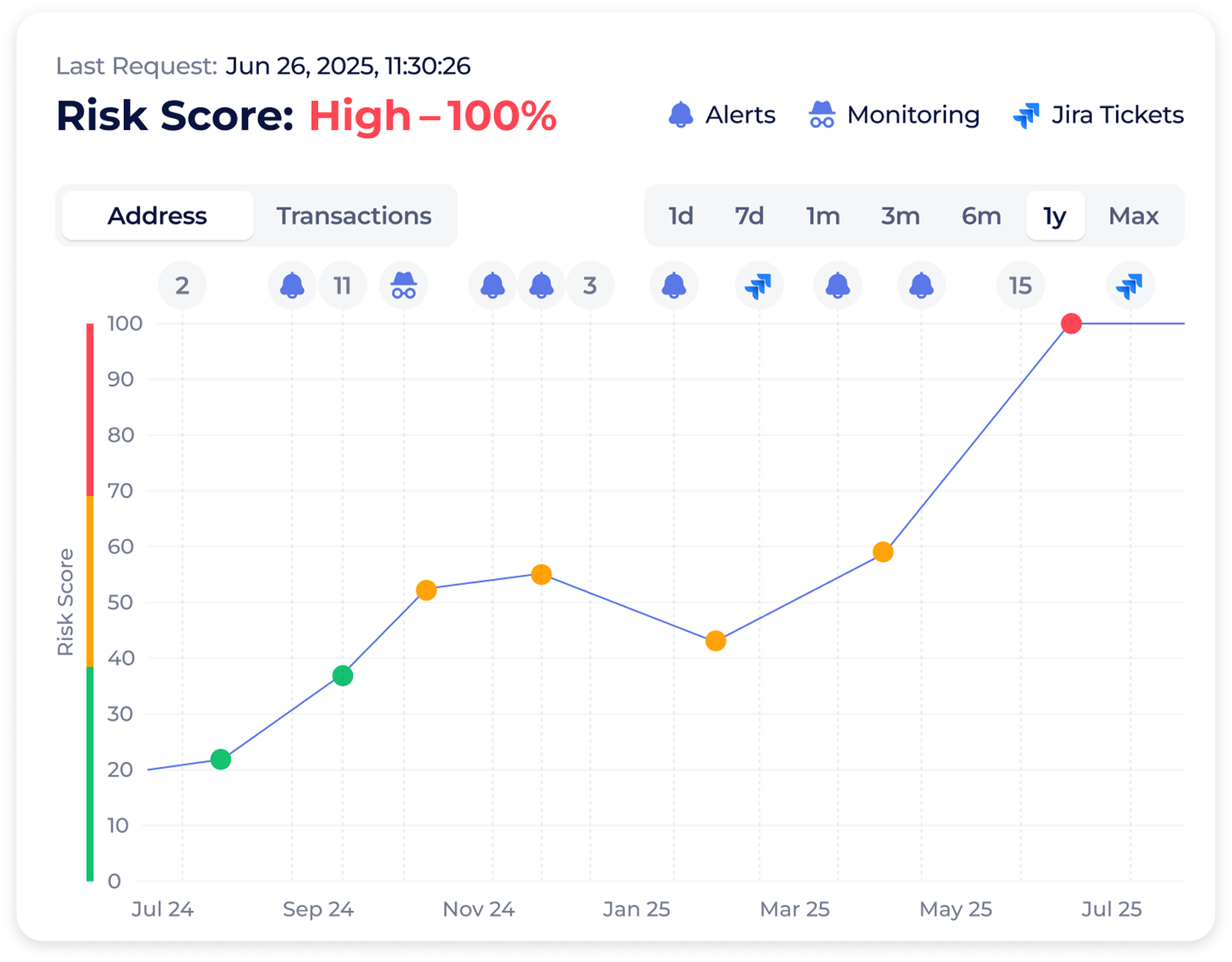
Compliance Memory: Risk Score tab
- Risk Reports Requests: All your previously requested risk reports with the report generation date, number of transactions, and risk score.
- Alerts section: The total number of alerts triggered for the address, with one-click navigation to the Alerts section.
- Cases section: The total number of cases related to the address, with one-click navigation to the Case Files section.
Besides, inside the Address Scoring and Transaction Scoring tabs, you can see a complete log of all scoring requests for the selected blockchain, including each address or transaction, its timestamp, and the risk score.
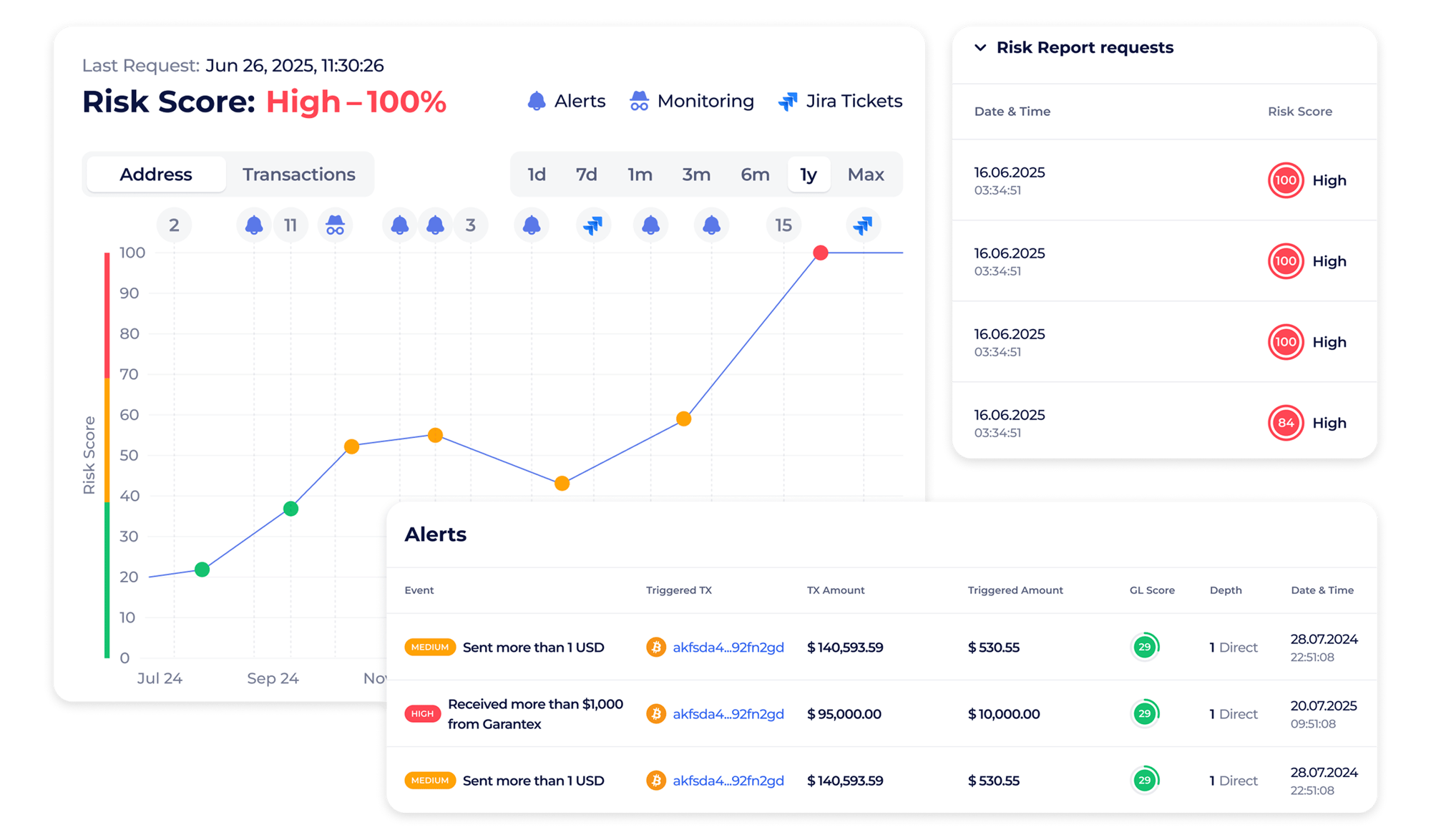
Compliance Memory feature
Compliance Memory use cases
Case 1. Preparing for an upcoming audit
Audits often require step-by-step explanations: who reviewed an alert, or how long a wallet stayed under monitoring, etc. It usually took hours to gather all this information.
With Compliance Memory, you can open the wallet’s history and instantly see every action that was previously performed on the address within the system. You can show the auditor the full history of decisions without searching through old files or trying to recreate past actions.
This reduces preparation stress, builds trust with regulators, and helps your team demonstrate a consistent compliance workflow.
Case 2. Reviewing a previously approved customer
A customer was onboarded months ago, and suddenly a new alert appeared. Without historical context, it’s hard to tell whether this is a real risk or simply a change in behavior.
Compliance Memory gives you the full picture in seconds: previous scores, alerts, and when monitoring started or ended. You no longer have to guess or dig through fragmented records to reconstruct what happened.
This helps maintain consistency and clarity during customer reviews and supports confident decision-making based on complete, structured information.
GL Lens: check wallet risk anywhere in seconds
Whether you’re reviewing transactions on a blockchain explorer, verifying a counterparty on a CEX website, or checking an address on other web platforms, switching tools just to see how risky an address is can slow you down.
With the Global Ledger Chrome extension, GL Lens, you can view wallet risk data (for example, ties to sanctioned entities, darknet, or high-risk counterparties) directly in your browser just by moving your cursor over an address on a web platform.
If you need deeper analysis, you can open the full risk report on the Global Ledger platform with one click. In most cases, the hover insight already gives you enough signal to decide what to do next.
With the GL Lens feature, you can:
How it works
Once you install the GL Lens Chrome extension, it works quietly in the background — nothing to configure and no API keys to connect.
You simply continue your daily work: browsing a blockchain explorer or checking an address in your onboarding tool. When a wallet address appears on any web platform, you no longer need to copy it and open another tab to verify it. Instead, you just hover your mouse over the address. A small GL pop-up instantly appears, showing the wallet’s risk label, its risk level, and the entity it’s associated with.
If the address looks suspicious and you want to investigate further, you can click “Full Report” or “Trace” to open it directly on the Global Ledger platform.
It’s the simplest way to stay aware of risks without breaking your workflow or switching tools dozens of times a day.
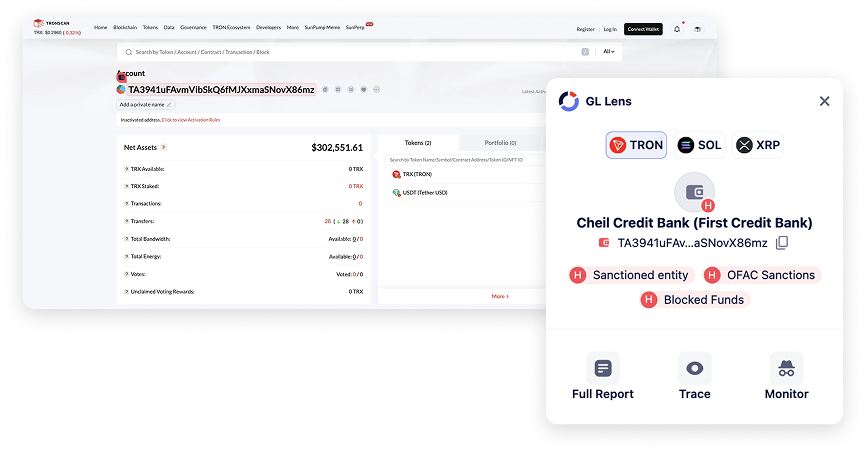
GL Lens feature
GL Lens use cases
Case 1. Screening counterparties during onboarding
For example, you’re reviewing a new client (or partner) application and the client has submitted one or several wallet addresses. Ordinarily, you’d copy each address, paste it into your risk tool, wait for the result, and repeat — a slow and distracting process.
With GL Lens, you simply hover over the address right inside your onboarding system or CRM. Within a second, you see whether the wallet is clean or if it has exposure to sanctions, darknet markets, or previous fraud.
This helps you make quick decisions based on an initial risk assessment, so you can confidently decide when a deeper client check is needed. Thus, it reduces the chance of missing high-risk exposure and saves a few minutes on every application. Over a month, that adds up to hours of reclaimed time.
Case 2. Reviewing suspicious withdrawals on a blockchain explorer
As a compliance officer, you may need to trace the destination of a withdrawal that raised an alert. Blockchain explorers usually show dozens of addresses in a single flow — and checking each one manually is slow and mentally exhausting.
With GL Lens, the process becomes much lighter. You open the explorer, and for each address in the withdrawal path, you point to it and immediately see the risk score.
This allows you to quickly map which hops are clean and which ones are problematic, helping you understand the flow of funds much faster. It’s especially helpful when handling high-volume investigations or time-sensitive alerts.
Public Cases: share cases securely with anyone
Alongside Compliance Memory and GL Lens, there is one more feature designed to make everyday compliance work smoother — Public Cases. It helps teams share investigation results with colleagues, partners, or even regulators without requiring them to log into Global Ledger.
With Public Cases, you can make any saved case accessible via a secure link. This removes the need to export screenshots, forward JSON files, or explain the flow manually. Anyone who opens the link can view the case directly in Global Ledger, making collaboration faster, clearer, and far less dependent on tooling access.
How it works
You open Case Files, tap the Edit icon on a saved case, and give the case a name and description. From there, you enable “Provide access to this case to anyone with the link” and copy the generated link.
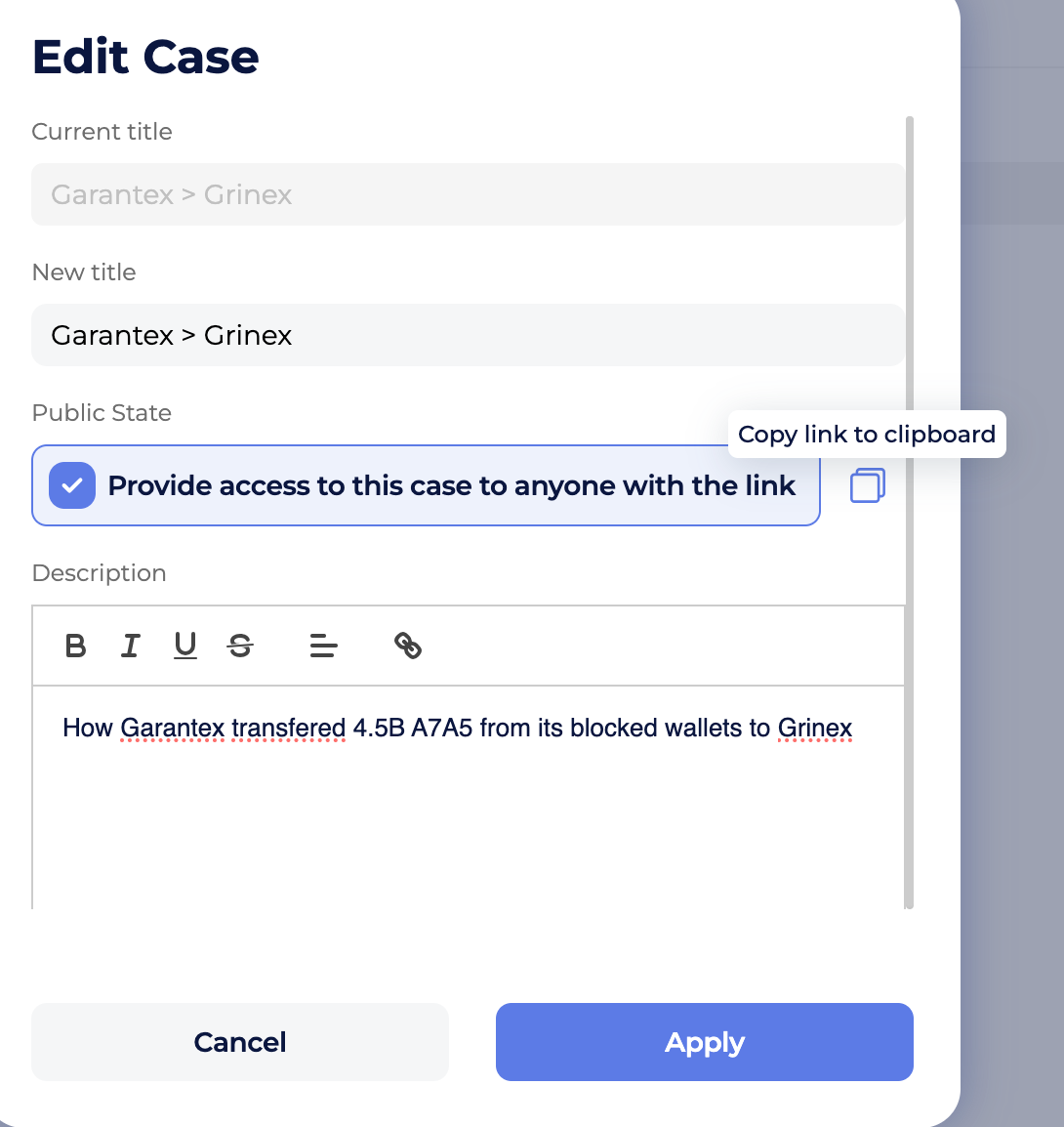
Public Cases feature: Edit Case tab
Once shared, the recipient can open the case in their browser exactly as you see it — even if they don’t have a Global Ledger account.

Public Cases feature
Make your compliance workflow simpler
Compliance Memory helps you understand the past. GL Lens helps you react in the present. Together, they reduce routine, prevent mistakes, and give VASP compliance teams the clarity they need to work confidently and stay always prepared — for audits, reviews, and high-stakes decisions.
Request your demo and see how Global Ledger can help you simplify your compliance workflow without adding cost.
.png?width=360) Token Recovery Investigations 190+ Hours Faster with Global Ledger
Token Recovery Investigations 190+ Hours Faster with Global Ledger
Learn how Token Recovery uses Global Ledger solutions to speed up investigations, what makes GL better than tops, and why the big picture isn’t always the best.